


What Are Cycling Training Zones? How Power Zones and FTP Can Improve Your Training
Cycling power is one of the most useful yet often misunderstood cycling metrics, especially when it comes to structured training. To train with power effectively, you first need to determine your functional threshold power (FTP) using a power meter. Once you know your FTP, you can use it to establish personalized training zones and better control the intensity of each ride.
Understanding your cycling training zones can make it much easier to plan workouts around specific goals, whether you want to build endurance, improve your fitness, or develop your speed and power. In this guide, we’ll cover the fundamentals of power-based cycling training, explain how to determine your FTP, and show you how to incorporate power zones into your workouts. We’ll also break down the different cycling power zones in an easy-to-follow chart.
What Is Cycling Power?
In simple terms, cycling power tells you how much work you’re producing while riding. It’s measured in watts, the standard unit of power, with one watt equal to one joule per second. You don’t need to worry about doing the math yourself, though. A power-measuring device can calculate this for you as you pedal.
Your power output is determined by two main factors: the force you apply to the pedals, known as torque, and your cadence, or the number of pedal revolutions per minute. Because these factors change constantly while you ride, measuring your power requires dedicated equipment rather than simply counting pedal strokes.
Today, power meters are available in several forms, including pedal-based, crank-based, and hub-based systems. Smart trainers and many indoor exercise bikes can also measure power while you ride. Some cycling apps can estimate power without a dedicated meter, but these estimates may not be as precise. For more accurate power-based training, it’s best to use a reliable power meter together with a cycling computer that can receive and display your power data in real time.
Why Does Cycling Power Matter?
Cycling power gives you a more objective way to understand how much effort you’re producing during a ride. Unlike heart rate or rate of perceived exertion (RPE), which can be influenced by factors such as stress, caffeine, heat, or fatigue, power measures your actual output in watts.
This makes power especially useful for structured training. By tracking your watts, you can better control workout intensity, compare your performance over time, and see whether your training is producing results.
For example, a climb may feel much harder on a hot day even if you’re producing the same power. Your heart rate and perceived effort may change, but your power output provides a consistent data point. That objectivity makes power one of the most useful metrics for cyclists who want to train more precisely and improve performance.
What Are the Power-Based Cycling Training Zones?
Cycling training zones divide your power output into different intensity levels, helping you structure rides around specific goals. For example, Zone 2 is commonly used for endurance training, while higher zones can target threshold and speed development.
Unlike heart rate zones, power zones are based on watts, usually calculated as a percentage of your functional threshold power (FTP). If your FTP is 200 watts, for example, 200 watts represents 100% of your FTP and serves as the reference for setting your zones.
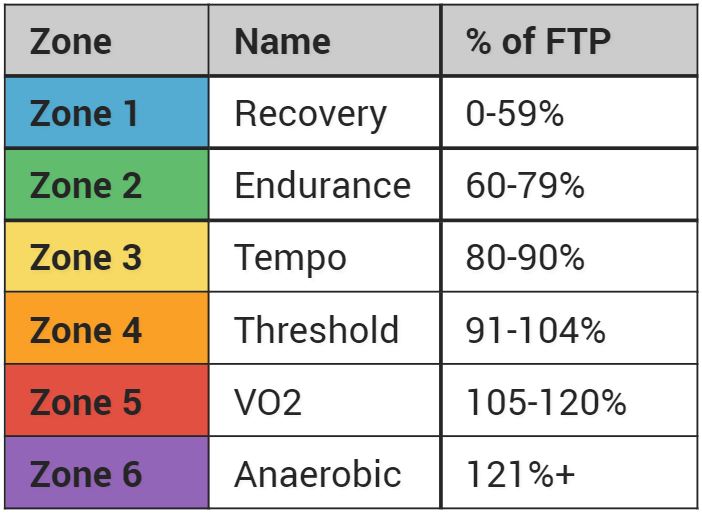
Keep in mind that power zones are guidelines, not strict limits. Your power naturally rises and falls during outdoor rides as you climb, accelerate, descend, or coast. The goal is to use zones to guide your effort and structure your training, not to stay perfectly within one number throughout the entire ride.
How Do You Set Your Cycling Power Zones?
Setting your cycling power zones starts with knowing your current functional threshold power (FTP). Many training platforms, such as TrainingPeaks, Peloton, and Zwift, can automatically calculate your training zones once you enter your FTP. To make sure your zones are useful, use a recent FTP value rather than relying on an old result or simply estimating it.
You can also calculate your zones manually. Once you know your FTP, multiply it by the percentage assigned to each training zone to determine the corresponding power range. For example, if your FTP is 200 watts, multiplying it by 0.55 gives 110 watts, meaning your recovery zone would be below 110 watts. Repeat the calculation with the appropriate percentage for each zone to build your complete power-based training range.
How Do You Test for FTP?
Your functional threshold power (FTP) represents the highest power you can realistically sustain for about an hour. However, a full 60-minute test is demanding and impractical for regular testing, so many cyclists use a shorter 20-minute FTP test instead.
A basic 20-minute FTP test looks like this:
- Warm up for 20 to 30 minutes, mainly in Zones 1 and 2, with a few short harder efforts.
- Find a relatively flat or gently uphill route outdoors, or use an indoor trainer with an FTP test workout.
- Start a 20-minute hard effort. Aim for a strong but sustainable pace and try to keep your power as consistent as possible.
- Record your average power for those 20 minutes.
- Cool down for 10 to 15 minutes.
- Multiply your 20-minute average power by 0.95 to estimate your FTP.
Your FTP can change as your fitness improves, so retesting periodically helps keep your training zones accurate.
Let Your Bike Computer Help

If you’re using the Coospo CS600 bike computer, the latest firmware update adds FTP Estimation, making it easier to monitor changes in your fitness without relying entirely on manual calculations. This can help keep your cycling power zones up to date as your training progresses.
How Often Should You Retest Your FTP?
Your FTP changes over time as your fitness, training load, and experience change. Beginners may see relatively quick improvements as they establish a consistent training routine, while FTP can also decline during a long break from cycling or with age. Updating your FTP helps ensure your cycling power zones continue to reflect your current fitness.
There’s no single testing schedule that works for everyone. Beginner cyclists may benefit from retesting every four to six weeks, especially when their fitness is improving quickly. More experienced riders can retest based on their training plan and season.
You can also use your perceived effort as a clue. If a workout that used to feel hard now feels noticeably easier, or your usual endurance rides suddenly feel much more demanding, your FTP and training zones may need to be reassessed.
Should You Pay Attention to Power or Heart Rate?
Power and heart rate provide different but complementary information during cycling. Power shows the amount of work you’re producing, while heart rate reflects how your body is responding to that effort. Ideally, your power and heart rate zones should work together to give you a more complete picture of your training.
For structured workouts, power is often the more objective metric because it is less affected by external factors. Heat, stress, fatigue, caffeine, and dehydration can all cause your heart rate to rise even when your power output stays the same.
However, heart rate can still be particularly useful during recovery and endurance rides. On a hot day, for example, you may want to keep your heart rate within an easy range rather than trying to maintain an exact power target.
Using both metrics can therefore help you better understand your training. If your heart rate consistently seems unusually high or low compared with your usual power output, it may also be a good time to reassess your fitness and retest your FTP.
Monitor Your Heart Rate

Power shows how much work you’re doing, while heart rate shows how your body responds. A heart rate monitor like the Coospo HW9 lets you track your heart rate in real time and connect to compatible cycling computers and training apps through Bluetooth and ANT+.
Using both power and heart rate can give you a better understanding of your effort and help you train more effectively.
How Do You Train Using Your Power Zones?
Once your power zones are set, you can use them to structure your workouts and control intensity. Most training plans specify how long to spend in each zone. With a power meter and cycling computer, you can monitor your power in real time and adjust your effort accordingly.
For example, a workout might include 10–15 minutes in Zone 1, followed by five 5-minute intervals in Zone 4, with 2 minutes of recovery in Zone 1 between each interval.

During the workout, displaying average lap power on your cycling computer can make it easier to stay on target. Just remember that power zones are a guide, not a rigid rule. Outdoor conditions can naturally cause your power to fluctuate, so focus on the overall effort rather than chasing a perfect number every second.


